Virgin Games Verification: KYC Documents and Review Times
 Available in GB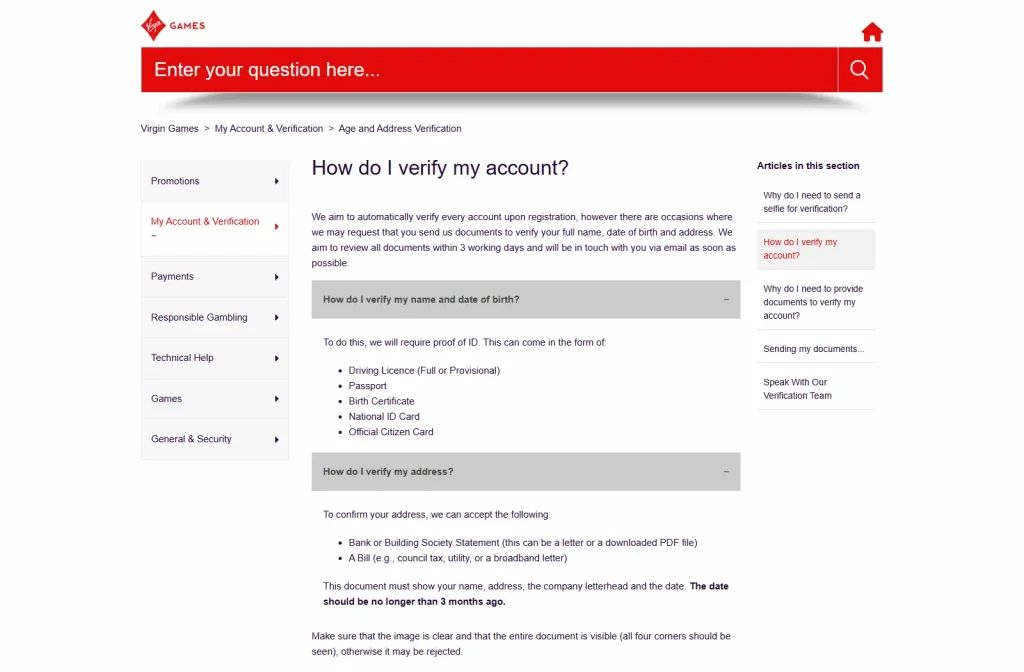
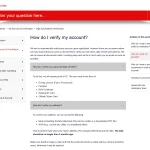
Virgin Games says it aims to verify accounts automatically at registration, but it can request documents when those checks do not confirm the required details. Its current official help article lists identity examples including a full or provisional driving licence, passport, birth certificate, National ID card and Official Citizen Card. For address checks, it currently lists a bank or building-society statement or a bill such as council tax, utility or broadband correspondence. The operator says it aims to review submitted verification documents within three working days. That is an operational aim, not a guaranteed completion time, and the exact documents requested can vary by account and verification stage.
Table of Contents
- Why Virgin Games may ask for documents
- Current identity document examples
- Current address document examples
- How long does Virgin Games verification take?
- What happens if automated verification does not work?
- Standard verification versus enhanced or source-of-funds checks
- Can verification affect withdrawals or account access?
- How to submit documents cleanly
- Why the exact request can vary
- Verification timing and expectations
- What to do if the review takes longer than the stated aim
- Privacy and document handling
- Verification and the operator relationship
- Virgin Games KYC checklist
- Bottom line
Why Virgin Games may ask for documents
Virgin Games’ verification guidance says checks are performed on registered accounts to confirm that the details supplied are correct. The operator specifically identifies age and UK residence among the checks. It says most checks are performed automatically or behind the scenes, but manual evidence can be requested when those checks do not verify the account information.
The practical implication is that KYC is not necessarily a document-upload step for every member at the same moment. Some accounts can pass automated checks without a manual upload. Others can receive a request for evidence to confirm identity, date of birth or address. The exact request should therefore come from the member’s account or official Virgin Games communication rather than from a generic checklist.
For the broader sign-up sequence, see Virgin Games registration. Verification details below cover documents and review timing.
Current identity document examples
As of 29 September 2026, the official Virgin Games help article says the identity section lists these examples for proving name and date of birth:
- Driving Licence – full or provisional.
- Passport.
- Birth Certificate.
- National ID Card.
- Official Citizen Card.
This is an official list of accepted examples in the current help article, but it should not be turned into a promise that every account will be asked for one of these documents and nothing else. Virgin Games itself frames the process around what needs to be verified in a particular case. A request can therefore be narrower or broader depending on the verification stage.
Use the instructions attached to the actual request. Sending extra documents that were not requested does not create a faster guaranteed path and can increase the amount of sensitive information being shared unnecessarily.
Current address document examples
The same official article currently lists a bank or building-society statement and a bill as address evidence examples. The bill examples given by Virgin Games include council tax, utility or broadband correspondence.
For address evidence, the current help article says the document must show the member’s name, address, company letterhead and date, and that the date should be no more than three months old. It also tells users to make sure the image is clear and the entire document is visible, including all four corners, because an incomplete image can be rejected.
These details are more useful than a generic instruction to “upload proof of address” because they describe what the operator currently says it needs to see. At the same time, they remain account-verification guidance rather than a fixed universal list for every member.
How long does Virgin Games verification take?
Virgin Games currently states that it aims to review all submitted verification documents within three working days and will contact the member by email when possible. The word “aims” matters. It is the operator’s current target for standard document review, not a guarantee that every verification case will be completed inside exactly three working days.
More complex checks can require additional information, follow-up questions or a different review path. Weekend and working-day timing also means that three working days should not be casually rewritten as 72 clock hours. If a case remains open, the account communication is the correct source for what the operator still needs.
The three-working-day figure is Virgin Games’ stated standard review aim, while actual completion can vary by case.
What happens if automated verification does not work?
The operator says it aims to verify accounts automatically on registration. If it cannot do so, the next step can be a request for documents covering full name, date of birth or address. Virgin Games’ separate explanation says these requests can be sent by email or shown on the account.
That means an automated-check failure should not be interpreted as an accusation or as permanent account rejection. It means the operator needs additional evidence before it can complete the relevant verification task. The account-specific request should say what evidence is needed.
Do not try to bypass this step by opening another account or changing details to force a match. Verification depends on consistent information. The appropriate response is to provide accurate evidence through the official route when requested.
Standard verification versus enhanced or source-of-funds checks
Virgin Games also publishes separate source-of-funds guidance. That material describes a deeper process in which members can be asked about employment status, occupation and monthly income, and can be asked for evidence showing how gambling activity is funded. Bank statements are one example mentioned in that separate process.
This is not the same as saying every player must provide employment records or source-of-funds documentation during ordinary registration. The operator says members can enter enhanced verification at different points depending on multiple factors, and its guidance tells members to refer to the specific email they receive for the information required.
The distinction prevents a common KYC error: combining every possible document from every verification stage into one giant mandatory checklist. Standard identity and address examples belong to ordinary verification guidance; enhanced financial checks can ask for different information when the operator’s process calls for it.
Can verification affect withdrawals or account access?
Verification can affect what an account is allowed to do because the operator may need to complete checks before certain account actions can proceed. Virgin Games’ help material also explains that account limits can be applied when more information is required. Current sources describe account-specific checks and support no universal sequence in which every withdrawal triggers KYC or verification begins only after a withdrawal request.
For withdrawal mechanics and current processing information, use the Virgin Games withdrawals guide. The key point here is narrower: if the account displays a verification request, unresolved checks can matter to account access or transactions, so follow the operator’s stated request rather than assuming that a payment screen overrides it.
How to submit documents cleanly
Virgin Games’ current address-document guidance gives two practical image-quality rules: the image should be clear and the whole document should be visible, including all four corners. Those requirements reduce avoidable rejections caused by cropped, blurred or incomplete evidence.
- Use the official upload or support route identified in the account message.
- Send the document type the operator actually requested.
- Make sure the entire document is visible rather than cropping around only a name or address.
- Check that text, dates and identifying details are readable.
- Do not edit, manipulate or fabricate documents.
- Do not send sensitive documents to third-party review sites, forums or unofficial support accounts.
These are process safeguards, not ways to influence the outcome of a KYC review. Virgin Games decides whether the evidence satisfies its checks.
Why the exact request can vary
Verification is evidence-driven. One account might be verified automatically. Another might need address evidence. Another might require identity evidence, and an enhanced review can involve financial information. Treating those paths as interchangeable produces bad advice because it turns examples into universal requirements.
The operator’s own wording supports a case-by-case approach. It says documents can be requested to verify specific details and that members should refer to communications telling them what is required. This is why the safest and most accurate checklist is short: confirm the request, use the official route, provide the requested evidence clearly and wait for the operator’s review.
Verification timing and expectations
| Stage | What the current source says | What not to assume |
|---|---|---|
| Registration | Virgin Games aims to verify accounts automatically | Automatic verification is not guaranteed for every account |
| Manual standard check | Identity or address documents can be requested | The same fixed document list is not mandatory for every member |
| Document review | The operator aims to review documents within three working days | Three working days is not a guaranteed maximum |
| Enhanced verification | Additional financial information or evidence can be requested | Every registration does not automatically require source-of-funds evidence |
This separation helps set realistic expectations without weakening the factual statements. The current document examples and review aim are directly sourced from Virgin Games, while the limits on what can be promised come from the wording of those same sources.
What to do if the review takes longer than the stated aim
If three working days pass, do not treat the account as automatically verified and do not resend a different set of documents unless asked. Check the account and email for a follow-up request first. A longer review can mean that additional information is needed or that the case is following a different verification path.
Virgin Games’ source-of-funds guidance says it will contact members after reviewing requested information, but it does not establish one universal deadline for every enhanced case. The three-working-day figure applies to the operator’s stated standard verification-document review aim.
Privacy and document handling
Identity and address documents are sensitive. Virgin Games says it takes the security of submitted documents and related communications seriously. From a user perspective, the important practical rule is to keep the transfer inside the operator’s official account, help-centre or support process rather than sharing documents with third parties that merely discuss the casino.
This editorial site does not create Virgin Games accounts, perform KYC or collect verification documents. Its role is to explain the current published process. Any actual document submission should take place only through the official operator route identified in the member’s account or communication.
Verification and the operator relationship
KYC sits within the operator’s wider Great Britain regulatory obligations. The Virgin Games licence and trust guide explains the operator and licensing context. That context explains why checks exist; document acceptance and complex-case timing still depend on the individual account review.
The useful division is simple: regulator and operator records establish who runs the service and under what framework; the current Virgin Games help article establishes the document examples and review aim; the member’s own account message establishes what that specific person must provide.
Virgin Games KYC checklist
- Check whether the account has already been verified automatically.
- If Virgin Games asks for documents, read the exact request before uploading anything.
- For identity, use one of the currently accepted examples if it matches the request.
- For address evidence, check that the document is recent enough and shows the required identifying details.
- Make the full image readable and visible, including all four corners when submitting a document image.
- Treat three working days as the operator’s review aim, not as a guaranteed deadline.
- If enhanced verification is requested, follow that request separately rather than assuming the standard KYC list is sufficient.
Bottom line
Virgin Games verification starts with automated checks but can move to manual evidence when the operator needs to confirm identity, date of birth or address. The current official help article provides concrete identity and address document examples and says the operator aims to review submitted documents within three working days. Those details are current as of 29 September 2026, but the exact request remains account-specific.
Use the account setup guide for the broader registration journey, the withdrawal times guide for payment processing, and the trust and operator guide for the licensing context.
For related information, see Virgin Games review.
Virgin Games Bonus UK: Welcome Offer and Current Terms
Is Virgin Games Licensed? Trust, Operator and Regulatory Record
Virgin Games is operated in the UK by Gamesys Operations Limited, a company within Bally's...

Virgin Games Bonus UK: Welcome Offer and Current Terms
The current Virgin Games UK welcome offer is Play £10, Get 100 Free Spins. New...

Virgin Games App: iOS, Android and Mobile Casino
Virgin Games currently offers a mobile casino app for iOS and Android in the UK....
Virgin Games Registration UK: Account Setup and Eligibility
Virgin Games registration in the UK is for adults aged 18 or over whose details...

Virgin Games Casino Games: Slots, Live Casino and Bingo
Virgin Games currently covers several distinct casino categories for UK players: online slots, live casino,...
Virgin Games Payment Methods UK: Deposits and Withdrawals
Virgin Games currently accepts Visa Debit, Visa Electron, Mastercard, Apple Pay and Google Pay for...